


Segway Mobility
3.7739.00 Reviews
App Specs
- Version
- 6.10.9
- Updated On
- License
- Free
- Downloads
- 1,000,000+
- Developer
- Ninebot(Beijing) Tech Co., Ltd.
- Categories
- Travel & Local
- Platform
- Android, iOS
Screenshots
 Analysis by AppCompare
In a shared home, a Segway-style ride can quickly become everyone’s vehicle: one person uses it for a short commute, another borrows it for errands, and someone else may simply want to check whether it is ready to go. That is where Segway Mobility makes the most sense to me—not as a general travel planner, but as a companion for a compatible Segway device. I would treat it as the place to manage the ride and the machine, while agreeing at home who is responsible for changing settings and checking the device before it is used.
One ride, several household routines
Imagine a weekday morning when one household member takes the device to a nearby stop, then another hopes to use it later for a quick errand. Ride history and battery information can help make that handoff less of a guessing game: the next rider has a better sense of recent use and whether a charge check is sensible. That is a practical advantage over relying on memory or a text message, especially when the device is shared rather than treated as one person’s personal ride.
I would still keep the routine simple. The person finishing a ride can check the device and tell the next rider about anything that needs attention; the app can support that habit, but it cannot replace clear communication. It is also worth remembering that app access and physical access are different things. Having the app on a phone does not, by itself, settle who is allowed to ride or who should be responsible for the vehicle.
Keep setup decisions with the right rider
When more than one person uses a device, the most useful setup is not necessarily the one with the most customization. I would first agree on settings that suit the least experienced regular rider, then avoid changing them casually just to make one trip feel faster or more convenient. Speed and lighting options affect how a ride feels, so a household benefits from knowing who can adjust them and when those changes should be discussed.
Before a new person rides, I would have them become familiar with the app and the device together, rather than handing over a phone with settings they have never seen. That also helps answer a common practical question: can someone use the vehicle without becoming the person who manages every connected detail? The app is designed around a Segway device, so it is most useful when the rider has access to the compatible vehicle and understands the agreed setup. It is not a replacement for deciding how household members share equipment.
Coordination matters more than extra features
For a family or group of housemates, the best use of ride records is modest: they can help people discuss when the device was last used and make shared routines easier to remember. I would not treat those records as a substitute for checking the machine before setting out, or assume that every household member will interpret the information the same way. A quick conversation is still the clearest way to settle who is taking the device, where it is going, and when it should be available again.
Community options may appeal to riders who like sharing routes or joining others, but they are not the main reason I would install the app for a shared household. If the people at home mainly need to coordinate a handoff, a simple agreed routine can be more effective than expecting social features to solve a scheduling problem. The app is at its best when each feature supports an actual ride rather than adding another task to manage.
Worth Reading Before You Choose

Flipboard Shows What News Apps Must Do Beyond the Feed

Switching to Android Auto Means Rethinking Your Driving Routine

Google Calendar Makes a Crowded Week Easier to Manage

Ludo King Makes the Most of the Minutes Between Plans

Baby Panda World Brings Quick Play to Modern Phones, but Its Game Library Feels Busy

ESPN’s Live Game View Makes Following Close Games Easier
Age, trust, and sensible boundaries
Segway Mobility is rated for Everyone, but an age label is not a judgment about whether a particular person should ride a particular device. I would make that decision based on the rider, the vehicle, local rules, and the household’s expectations. Safety reminders can be useful prompts, yet they do not make a ride safe on their own; a helmet, attention to surroundings, and responsible choices still matter.
For parents or other household decision-makers, I would be clear about who may use the device and who is permitted to alter its settings. That is a trust and communication issue, not something I would assume an app can settle through family controls. If a young or inexperienced rider is involved, a responsible adult should make sure the person understands the device and the rules before a trip. Anyone looking for a dedicated family-tracking or parental-management tool should choose a product built for that purpose instead.
Getting Started with Segway Mobility
First things first, let's talk about getting started with the app. Downloading and setting up the Segway Mobility app was a breeze. It's available on both Android and iOS platforms, so no matter what device you’re rocking, you’re covered. Once installed, I was greeted with a clean, intuitive interface that made navigation a cinch.
Setting Up Your Ride
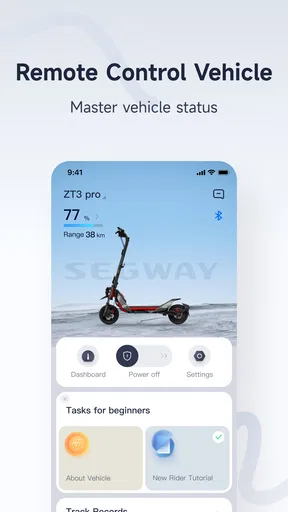
Now, setting up your ride is crucial, and thankfully, the app makes it easy. After pairing the app with your Segway device, you can customize settings like speed limits and lighting options. I found the customization options quite extensive, allowing me to tailor my ride to my preferences. The app even lets you track your battery life, so you’re never caught off guard.
For a shared vehicle, I would make the first pairing and settings check part of the handoff routine instead of assuming every rider has seen the same screen or chosen the same preferences. A quick battery check before leaving can also prevent a frustrating return-to-the-device problem later. Because settings can shape the feel of a ride, it is sensible to agree on a baseline and tell the next rider if anything has changed.
On the Road
Once everything is set up, it’s time to hit the road. The app provides real-time navigation, which is super handy for avoiding traffic jams. Trust me, having a real-time map on your phone while cruising around town is a game-changer. I appreciated the turn-by-turn directions and the ability to mark favorite routes. It’s like having a personal tour guide in your pocket!
In everyday use, I would think of those route tools as support for planning, not permission to focus on a phone while moving. Before setting off, it is more useful to choose a route and save a familiar one than to keep checking the screen at every turn. That distinction matters for short trips, where a route you already know may be simpler than following directions, and for unfamiliar streets, where a stop to check the map is safer than trying to read it in motion.
What stood out to me was the app’s ability to track my ride statistics. You can monitor your speed, distance, and even calories burned. For someone who likes to keep tabs on their fitness goals, this feature was a pleasant surprise. Plus, the app stores your ride history, so you can relive your adventures anytime.
Those records are more useful as a personal reference than as a precise training plan. I would use them to compare the shape of my own rides or remember a route, not to make health decisions from a calorie estimate. For a household, ride history can also prompt a useful check-in about a shared vehicle, but it should not become a substitute for asking the person who last used it whether anything needs attention.
Safety First
One of the standout features of the Segway Mobility app is its focus on safety. The app includes a lock feature that provides an extra layer of security for your Segway. It’s like having a virtual padlock! I felt more at ease leaving my Segway unattended, knowing it was secured through the app.
I would regard that lock as an added deterrent, not a reason to leave a vehicle wherever I please. A connected lock can be helpful when I make a brief stop, but sensible parking and keeping an eye on the surroundings remain important. In a shared household, it is also worth making sure the rider who leaves the vehicle knows its security routine; otherwise, the next person may arrive to find it unavailable or unsecured.
Additionally, the app offers safety tips and reminders to ensure you’re riding responsibly. It’s always nice to have a friendly reminder to wear a helmet or to be cautious in crowded areas.
Community and Connectivity
Another cool aspect of the app is the community features. You can connect with fellow Segway enthusiasts, share your favorite routes, and even join group rides. It’s a great way to meet like-minded people and explore new areas of your city. The sense of community is palpable, and it’s always fun to see where others are riding.
That social side is a bonus rather than a requirement. If I were installing the app only to manage a household commute, I would focus on pairing, ride information, and the device settings first; community participation can wait until I have a reason to share routes or ride with others. Riders who prefer to keep their trips private may simply get more value from the device-management tools than from social activity.
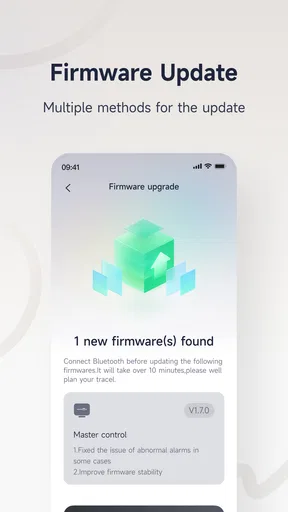
The app also supports firmware updates, so you’re always riding with the latest features and improvements. It’s like having a tech team in your pocket, ensuring your Segway is always performing at its best.
For a shared device, I would make updates a deliberate check rather than something to start moments before someone needs to leave. The person managing the device can look after that task when there is time, then let the other riders know the vehicle is ready. This avoids turning a routine trip into a scramble and gives everyone a clearer sense of who handles the connected side of ownership.
Where it fits among travel apps
Compared with a general mapping app, Segway Mobility is more closely tied to the ride and the Segway itself. A map app may be the more familiar choice if I only need directions for walking, driving, or public transport, while this app makes more sense when I want device pairing, ride details, and connected settings in one place. I would not install it expecting it to replace every travel tool on my phone; its value depends on actually using a compatible Segway device.
That distinction also helps with the question of whether it is worth keeping installed. A regular rider who checks the vehicle’s battery, adjusts settings, or reviews rides has a clearer reason to use it than someone who borrows a device once in a while. Occasional riders may be better served by learning the owner’s handoff routine and using their usual navigation option where appropriate, rather than treating this as a universal city-travel app.
Who should choose it—and who should pass
I see the strongest fit for Segway owners who ride often enough to care about device settings, battery status, security, and ride history. It can also suit a household with a shared device if everyone agrees on a few basics: who manages changes, how riders communicate after use, and what to check before setting off. The app is free, and Ninebot(Beijing) Tech Co., Ltd. develops it; it has an average rating of 3.5 from around 12,000 ratings, which suggests that experiences are mixed rather than universally smooth.
On the other hand, someone who wants only transit directions, a walking map, or a general trip organizer should look at conventional travel apps instead. The same goes for a parent seeking dedicated location supervision or a household needing formal scheduling and account controls: I would not choose Segway Mobility on the assumption that it supplies those functions. Its purpose is narrower, and that focus is useful only when it matches the device and the way you ride.
Compatibility, age, and expectations
The app is listed for Android 8.0 and above, and its content rating is Everyone. It was released on January 20, 2020, and the current version is 6.10.5. It has passed 1 million installs, but popularity alone does not tell me whether it will suit a particular rider. I would check that my phone meets the operating-system requirement and that I have access to a compatible Segway device before building a routine around the app.
The age rating is useful context for the app itself, not a substitute for deciding whether a child or inexperienced person should ride. I would keep device permission, physical readiness, and local riding rules as separate questions. That boundary is especially important in shared homes: an app may make the vehicle easier to manage, but the household still has to decide who can ride and who is accountable for it.
Final Thoughts
In conclusion, the Segway Mobility app offers a comprehensive suite of features that enhance the Segway riding experience. From customization to real-time navigation, safety features, and community connectivity, there’s a lot to love here. Whether you’re a seasoned rider or a newbie, the app caters to all levels of expertise.
So, if you're looking to take your urban commuting to the next level, give the Segway Mobility app a spin. It’s more than just an app; it’s your ultimate companion on the road. Glide on, my friends!
My household verdict is more measured: I would recommend it to a regular Segway rider who wants a connected way to check and manage the ride, and I would consider it for a shared vehicle when the people using it communicate clearly. I would skip it if I had no compatible device, wanted a broad travel planner, or needed family controls rather than a ride companion. For the right owner, the practical value is in bringing device-related tasks together; the best results still come from sensible settings, responsible riding, and a clear handoff between people.
Pros
- User-friendly interface for easy navigation.
- Real-time tracking enhances security.
- Customizable riding modes for flexibility.
- Robust battery life for long rides.
- Integrated GPS for accurate route mapping.
Cons
- Limited compatibility with older phones.
- App updates can be infrequent.
- Requires a stable internet connection.
- Some features locked behind paywall.
- Occasional connectivity issues with devices.
FAQs for Segway Mobility
What is Segway Mobility and what can I use it for?
Segway Mobility is a versatile transportation app designed for both personal and shared use. It allows users to locate and unlock a range of Segway devices, including scooters and bikes, for convenient urban commuting. The app offers features like real-time GPS tracking, easy payment options, and ride history, making it ideal for short-distance travel.
Is the Segway Mobility app available on both Android and iOS platforms?
Yes, the Segway Mobility app is available for download on both Android and iOS platforms. Users can easily find it on the Google Play Store and the Apple App Store. It’s designed to provide a seamless experience across different devices, ensuring accessibility for a wide range of users.
What are the key features of the Segway Mobility app?
The Segway Mobility app includes features like real-time GPS tracking, easy device unlocking via QR code scanning, and a secure payment system. Users can also benefit from ride history logs, customer support, and safety tutorials, making it a comprehensive solution for urban mobility needs.
Are there any costs associated with using Segway Mobility?
While downloading the Segway Mobility app is free, users are charged for the rides they take. Costs can vary depending on the duration and distance of the ride, as well as the specific device used. The app provides a transparent pricing structure, so users can review costs before confirming a ride.
How does Segway Mobility ensure user safety?
Segway Mobility prioritizes user safety by providing in-app safety tutorials and guidelines. The app also features a robust customer support system to address any issues users might encounter. Additionally, all devices undergo regular maintenance checks to ensure they are in optimal working condition.


